
NotebookLM export guide
Export a NotebookLM quiz to PowerPoint (PPTX)
Download the open NotebookLM quiz as an editable PPTX deck for teacher-led review, training sessions, presentation games and whole-class discussion.
Chrome extension · Review generated content before publishing or grading
Quick answer
How to export a quiz from Gemini Notebook to PowerPoint (PPTX)
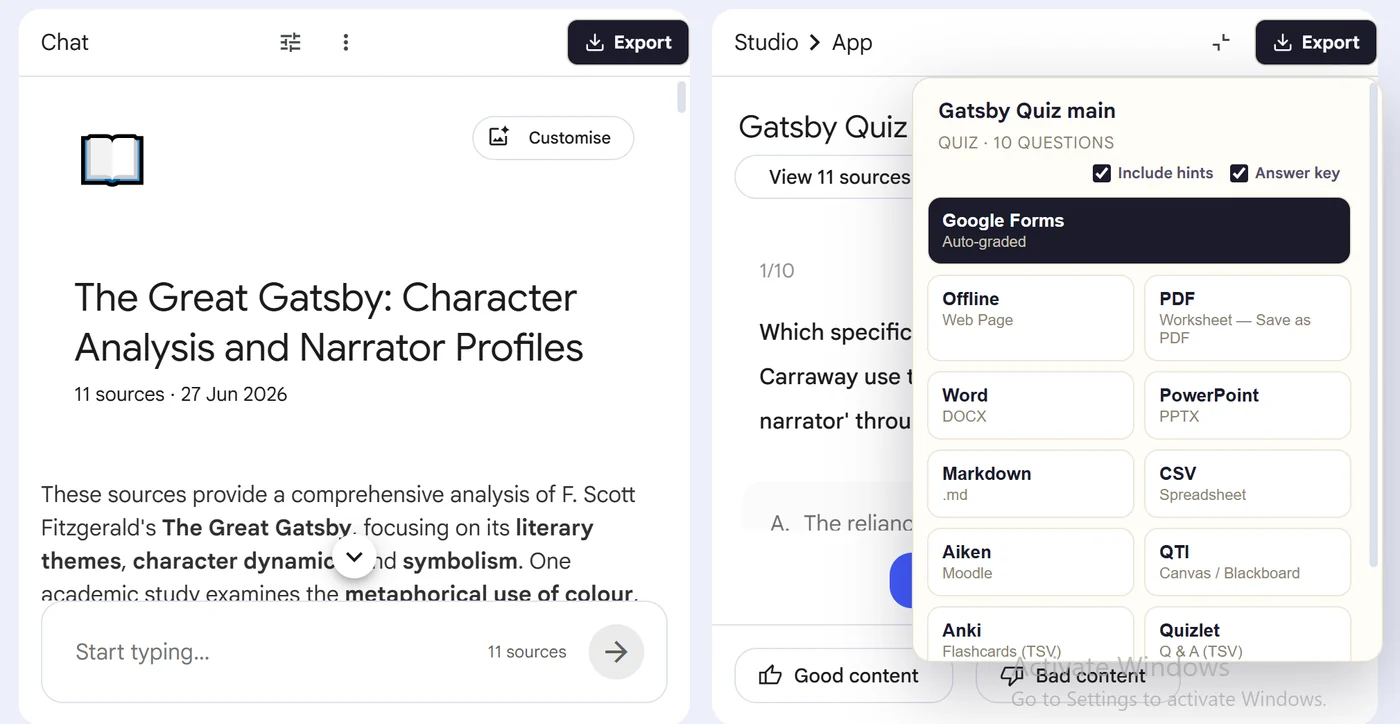
First, install the Super NotebookLM Exporter Chrome extension linked on this page. Next, open NotebookLM Studio, select the completed quiz and wait for the canvas to load. Locate the Export ▾ button at the top of the quiz canvas. Then, open the format menu, choose PowerPoint (PPTX) and set the available answer option. Finally, download the PPTX deck and open it in PowerPoint or Google Slides to check long questions and apply your theme.
Why export it?
Why export?
An interactive NotebookLM quiz is difficult to present to a room. A PowerPoint deck lets an instructor reveal questions at a controlled pace, discuss answers and add the quiz to an existing lesson without taking screenshots.
Native option check
Can Gemini Notebook handle this export natively?
Paid Gemini Notebook chat can generate downloadable presentations, but that is different from converting the completed Studio quiz already on screen. The extension turns the existing quiz artifact into an editable PPTX deck.
Product capabilities reviewed against current Google help documentation in August 2026.
✓
A PowerPoint (PPTX)-ready output
✓
Questions and choices stay grouped
✓
Less copy-paste and fewer transcription errors
✓
A reusable asset outside NotebookLM
Step-by-step guide
Download a NotebookLM Quiz as PowerPoint in 5 Steps
Open NotebookLM Studio, select the completed quiz and wait for the canvas to load
Locate the Export ▾ button at the top of the quiz canvas
Open the format menu, choose PowerPoint (PPTX) and set the available answer option
Download the PPTX deck and open it in PowerPoint or Google Slides to check long questions and apply your theme
Where it fits
Who uses this export workflow?
01
Whole-class review
02
Training sessions
03
Team knowledge checks
04
Presentation-based games
Common follow-up questions
What people need to know before using this export
Is the PowerPoint editable?
Yes. The extension generates a PPTX file, so slide text and presentation styling can be edited in PowerPoint.
Does each quiz question become a slide?
The export organizes quiz items as presentation slides, making them practical for paced review. Inspect long answer choices after opening the deck.
Can I use the deck in Google Slides?
Upload the PPTX to Google Drive and open it with Google Slides, then review fonts, spacing and theme conversion.
Questions, answered
FAQ
Can I export a NotebookLM quiz to PowerPoint (PPTX)?+
Yes. Open the quiz, choose Export, select PowerPoint (PPTX), and download or import the generated output.
Does the export include answer choices?+
Yes. Multiple-choice questions retain their available options in the destination-appropriate structure.
Does it include correct answers?+
Supported quiz exports carry answer information where the destination format allows it. Review the export settings before creating a student-facing copy.
Should I review the quiz after export?+
Yes. Always verify AI-generated questions, answers and destination formatting before assigning or publishing the quiz.
Can NotebookLM turn a quiz into presentation slides?+
Yes. Super NotebookLM Exporter converts the open quiz into an editable PPTX deck for guided review, classroom presentation or a quiz game.
Can Google Slides open the downloaded NotebookLM quiz?+
Yes. Upload the PPTX to Google Drive and open it with Google Slides, then check fonts, spacing and long answer choices after conversion.
Product references
Native-feature comparisons on this page were checked against Google's current Gemini Notebook help pages.
Ready when the artifact is
Export a NotebookLM quiz to PowerPoint (PPTX)
Download the open NotebookLM quiz as an editable PPTX deck for teacher-led review, training sessions, presentation games and whole-class discussion.
Add to Chrome Extension