
NotebookLM export guide
Export a NotebookLM quiz to Quizlet
Convert NotebookLM quiz questions into tab-separated question-and-answer pairs ready for Quizlet's website import tool.
Chrome extension · Review generated content before publishing or grading
Quick answer
How to export a quiz from Gemini Notebook to Quizlet
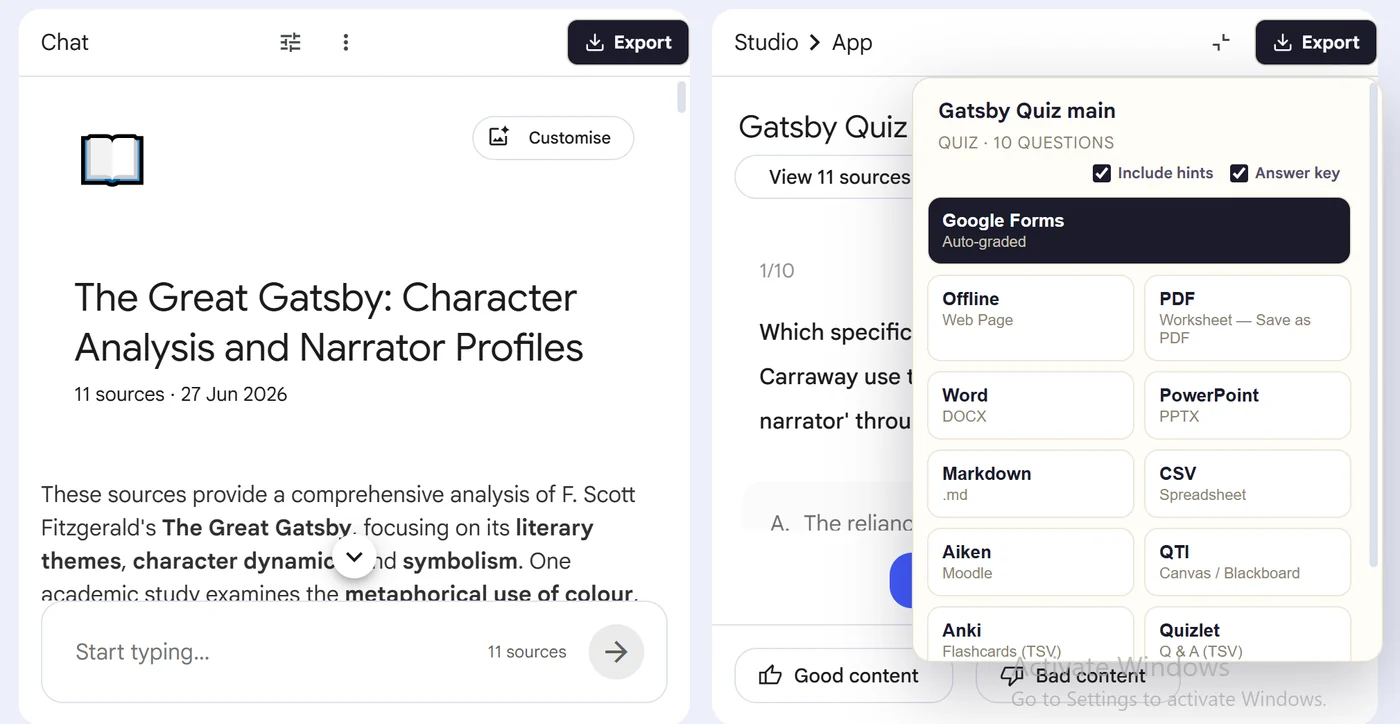
First, install the Super NotebookLM Exporter Chrome extension linked on this page. Next, open NotebookLM Studio, select the completed quiz and wait for the quiz canvas to load. Locate the Export ▾ button at the top of the canvas. Then, choose Quizlet to download the tab-separated question-and-answer text. Finally, open Quizlet's website importer, paste the content, select Tab between fields and New line between cards, then create the set.
Why export it?
Why export?
A NotebookLM quiz cannot be shared as a reusable Quizlet set without converting its prompts and answers. Manual pasting makes it easy to split rows incorrectly or pair a question with the wrong answer.
Native option check
Can Gemini Notebook handle this export natively?
NotebookLM does not create Quizlet sets from completed quizzes. The extension prepares tab-separated question-and-answer text, and Quizlet's website import tool creates the set.
Product capabilities reviewed against current Google help documentation in August 2026.
✓
A Quizlet-ready output
✓
Questions and choices stay grouped
✓
Less copy-paste and fewer transcription errors
✓
A reusable asset outside NotebookLM
Step-by-step guide
Download a NotebookLM Quiz for Quizlet in 5 Steps
Open NotebookLM Studio, select the completed quiz and wait for the quiz canvas to load
Locate the Export ▾ button at the top of the canvas
Choose Quizlet to download the tab-separated question-and-answer text
Open Quizlet's website importer, paste the content, select Tab between fields and New line between cards, then create the set
Where it fits
Who uses this export workflow?
01
Shared study sets
02
Class review
03
Vocabulary practice
04
Mobile revision
Common follow-up questions
What people need to know before using this export
Does this create a Quizlet quiz or a flashcard set?
It prepares the NotebookLM questions and answers as a Quizlet import set. Quizlet then provides its own study and test modes around that set.
Can I import directly in the Quizlet mobile app?
Quizlet's current help directs users to import flashcard content on the website, after which the saved set can be studied on mobile.
Why use tabs instead of commas?
Questions and answers often contain commas. Tab separation reduces accidental field splitting when the text is pasted into Quizlet's importer.
Questions, answered
FAQ
Can I export a NotebookLM quiz to Quizlet?+
Yes. Open the quiz, choose Export, select Quizlet, and download or import the generated output.
Does the export include answer choices?+
Yes. Multiple-choice questions retain their available options in the destination-appropriate structure.
Does it include correct answers?+
Supported quiz exports carry answer information where the destination format allows it. Review the export settings before creating a student-facing copy.
Should I review the quiz after export?+
Yes. Always verify AI-generated questions, answers and destination formatting before assigning or publishing the quiz.
Can I import a NotebookLM quiz into the Quizlet mobile app?+
Quizlet currently handles content imports on its website. Create the set on the web, then study it in the mobile app after it is saved.
Which separators should I use for a Quizlet import?+
Use a tab between each question and answer and a new line between cards, then verify the import preview before creating the set.
Product references
Native-feature comparisons on this page were checked against Google's current Gemini Notebook help pages.
Ready when the artifact is
Export a NotebookLM quiz to Quizlet
Convert NotebookLM quiz questions into tab-separated question-and-answer pairs ready for Quizlet's website import tool.
Add to Chrome Extension