
NotebookLM batch workflow
NotebookLM Quiz Exporter for Gemini Notebook: Export Multiple Quizzes
Use NotebookLM Quiz Exporter for Gemini Notebook when a notebook contains several completed quizzes and one-at-a-time exporting becomes the bottleneck.
Chrome extension · Review generated content before publishing or grading
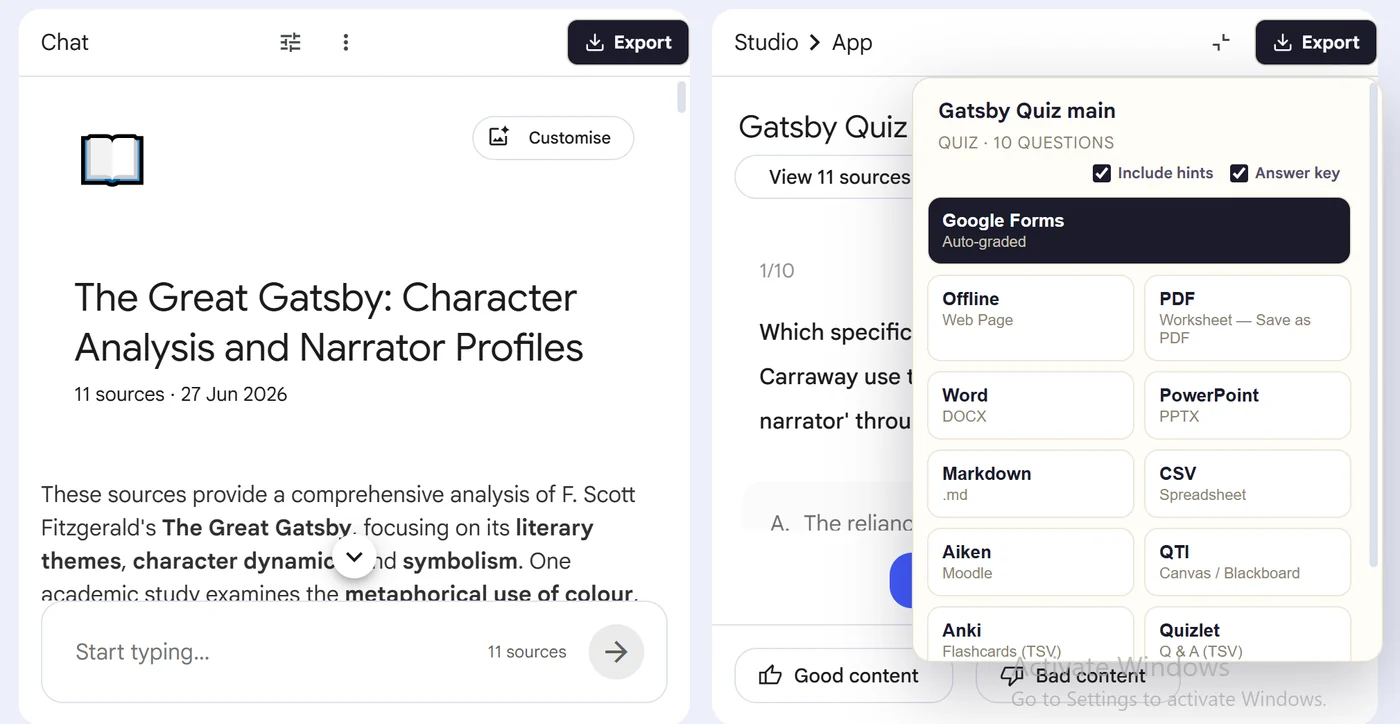
Product preview
See what the export looks like

Quick answer
How to batch export multiple quizzes from Gemini Notebook
First, install the dedicated NotebookLM Quiz Exporter for Gemini Notebook extension linked on this page. Next, open the notebook that contains the completed quizzes and keep the Studio panel available. Locate the Export quiz button in the Studio panel or at the top-right of the open quiz canvas. Then, click it, let the scanner find existing quiz artifacts, select the quizzes and choose an export format. Finally, download the selected files; when more than one quiz is exported, open the ZIP and verify each named output.
Why export it?
Why export?
A notebook can contain several quizzes created for different topics or source groups. Opening, exporting and naming each one individually turns a simple archive or course migration into repetitive work.
Native option check
Can Gemini Notebook handle this export natively?
Batch export is about scale rather than a new file type. The dedicated extension discovers completed quiz artifacts in the current NotebookLM session and prepares multiple outputs together.
Product capabilities reviewed against current Google help documentation in August 2026.
✓
Discover several completed quizzes
✓
Reduce repetitive open-and-export steps
✓
Package multiple outputs together
✓
Keep individual quiz titles in the archive
Step-by-step guide
Download Multiple NotebookLM Quizzes in 5 Steps
Open the notebook that contains the completed quizzes and keep the Studio panel available
Locate the Export quiz button in the Studio panel or at the top-right of the open quiz canvas
Click it, let the scanner find existing quiz artifacts, select the quizzes and choose an export format
Download the selected files; when more than one quiz is exported, open the ZIP and verify each named output
Where it fits
Who uses this export workflow?
01
Course backups
02
Multi-unit assessment migration
03
Teacher resource libraries
04
Compliance and archiving
01
Batch only completed quiz artifacts
The exporter reads quizzes that already exist in the notebook. It does not generate new quizzes. Confirm each quiz is complete and correctly titled before starting the batch.
02
Test before a large migration
Export a small set first, inspect the files, and confirm the destination import settings. This catches formatting or LMS compatibility issues before you process an entire course.
Common follow-up questions
What people need to know before using this export
Can it export quizzes that have not been generated?
No. The batch extension works with completed quiz artifacts already present in the notebook session.
Does batch export combine all questions into one quiz?
The workflow is designed to package multiple quiz outputs while retaining their individual identities rather than silently merging them.
Why test a small batch first?
A sample reveals naming, formatting and destination compatibility issues before you process a large course or question library.
Questions, answered
FAQ
Can I export all NotebookLM quizzes at once?+
The batch extension is designed to discover and export multiple completed quizzes from the open notebook in one workflow.
Does the batch exporter create quizzes?+
No. It exports quizzes that have already been generated and completed in NotebookLM.
Which extension handles batch exports?+
Use NotebookLM Quiz Exporter for Gemini Notebook linked on this page, not the Super NotebookLM Exporter extension for individual artifacts.
Should I test the files before importing them?+
Yes. Validate a small batch in the destination platform before moving a large or high-stakes question bank.
Can the batch exporter find quizzes that were never generated?+
No. It scans existing completed quiz artifacts available in the notebook session; it does not create missing quizzes.
What is included in a NotebookLM batch export ZIP?+
When several quizzes are selected, the download packages the individual named outputs together so each quiz remains separate and identifiable.
Product references
Native-feature comparisons on this page were checked against Google's current Gemini Notebook help pages.
Ready when the artifact is
NotebookLM Quiz Exporter for Gemini Notebook: Export Multiple Quizzes
Use NotebookLM Quiz Exporter for Gemini Notebook when a notebook contains several completed quizzes and one-at-a-time exporting becomes the bottleneck.
Add to Chrome Extension