
NotebookLM export guide
NotebookLM Flashcard Exporter for Anki, Quizlet, PDF and More
Download a deck for spaced repetition, share it through a study platform, print it, present it or keep the underlying card data.
Chrome extension · Review generated content before publishing or grading
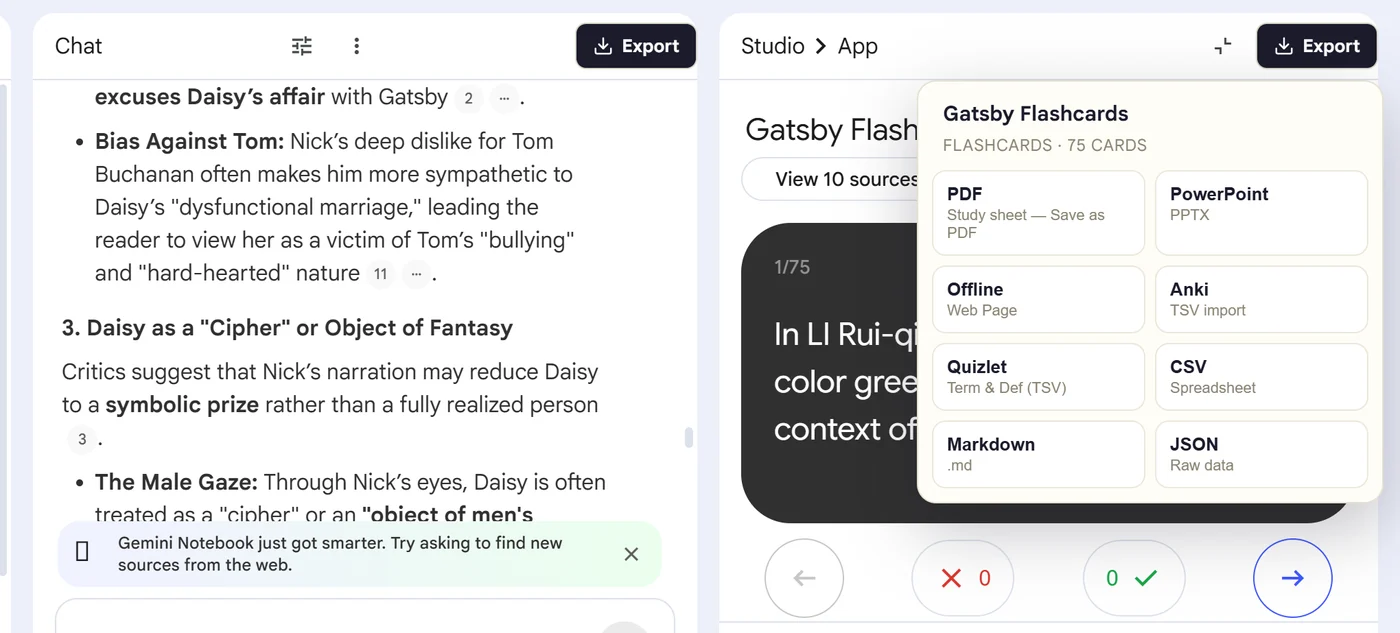
Product preview
See what the export looks like

Quick answer
How to export flashcards from Gemini Notebook
First, install the Super NotebookLM Exporter Chrome extension linked on this page. Next, open NotebookLM Studio, select a completed flashcard set and wait for the card canvas to load. Locate the Export ▾ button at the top of the flashcard canvas beside the NotebookLM controls. Then, choose Anki, Quizlet, PDF, PowerPoint, Markdown, CSV or JSON based on where you will study or edit the deck. Finally, download the file and review the front-and-back pairs in the destination app before relying on the deck.
Why export it?
Why export?
NotebookLM's interactive flashcards are useful for a study session, but learners often have an established system for scheduling reviews, sharing decks or editing cards in bulk.
Native option check
Can Gemini Notebook handle this export natively?
Gemini Notebook now includes native flashcard CSV download. The exporter differentiates through Anki- and Quizlet-ready text, printable study sheets, PowerPoint, Markdown, JSON and a consistent workflow across artifact types.
Product capabilities reviewed against current Google help documentation in August 2026.
✓
Anki and Quizlet import files
✓
Printable PDF study sheets
✓
PowerPoint study decks
✓
Markdown, CSV and JSON source copies
Step-by-step guide
Download NotebookLM Flashcards in 5 Steps
Open NotebookLM Studio, select a completed flashcard set and wait for the card canvas to load
Locate the Export ▾ button at the top of the flashcard canvas beside the NotebookLM controls
Choose Anki, Quizlet, PDF, PowerPoint, Markdown, CSV or JSON based on where you will study or edit the deck
Download the file and review the front-and-back pairs in the destination app before relying on the deck
Where it fits
Who uses this export workflow?
01
Spaced repetition
02
Shared class decks
03
Offline revision
04
Bulk card editing
01
Use native CSV when CSV is all you need
Google's built-in CSV download is the simplest option for a basic spreadsheet copy. Use the extension when you want a different destination or the same exporter across chats, quizzes, flashcards and mind maps.
02
Formatting matters after import
Anki and Quizlet apply their own field and styling rules. Check equations, tabs, line breaks and long answers after importing a sample deck.
Common follow-up questions
What people need to know before using this export
What formats can NotebookLM flashcards export to?
NotebookLM provides native CSV. The extension adds Anki, Quizlet, printable PDF, PowerPoint, Markdown, JSON and an offline web-page workflow.
Which format is best for spaced repetition?
Use the Anki text export when you want Anki's scheduling system. Use Quizlet when sharing and browser-based study are the priority.
Which format is best for editing many cards?
CSV is the simplest for bulk spreadsheet editing. JSON is better when software or automation will process the card records.
Questions, answered
FAQ
How do I export flashcards from NotebookLM?+
You can use NotebookLM's native CSV download or install the exporter for Anki, Quizlet, PDF, PowerPoint, Markdown and JSON options.
Can I move NotebookLM flashcards to Anki?+
Yes. Export the deck as Anki-ready tab-separated text, then import it into an Anki note type with front and back fields.
Can I move NotebookLM flashcards to Quizlet?+
Yes. Export a tab-separated term-and-definition file and paste or upload it through Quizlet's import workflow.
Can I print NotebookLM flashcards?+
Yes. Choose the PDF study-sheet output and print it or save it as a PDF.
Can NotebookLM download flashcards as CSV without an extension?+
Yes. NotebookLM includes a native CSV download for flashcards. Use Super NotebookLM Exporter when you need Anki, Quizlet, PDF, PowerPoint, Markdown or JSON.
Which format should I use for NotebookLM flashcards?+
Use Anki or Quizlet text for study-app imports, PDF for printing, PowerPoint for presentation, CSV for spreadsheets and JSON for development.
Product references
Native-feature comparisons on this page were checked against Google's current Gemini Notebook help pages.
Ready when the artifact is
NotebookLM Flashcard Exporter for Anki, Quizlet, PDF and More
Download a deck for spaced repetition, share it through a study platform, print it, present it or keep the underlying card data.
Add to Chrome Extension