
NotebookLM export guide
Export NotebookLM Flashcards to Quizlet
Export NotebookLM flashcards as tab-separated terms and definitions ready to paste into Quizlet's website import screen.
Chrome extension · Review generated content before publishing or grading
Quick answer
How to export flashcards from Gemini Notebook to Quizlet
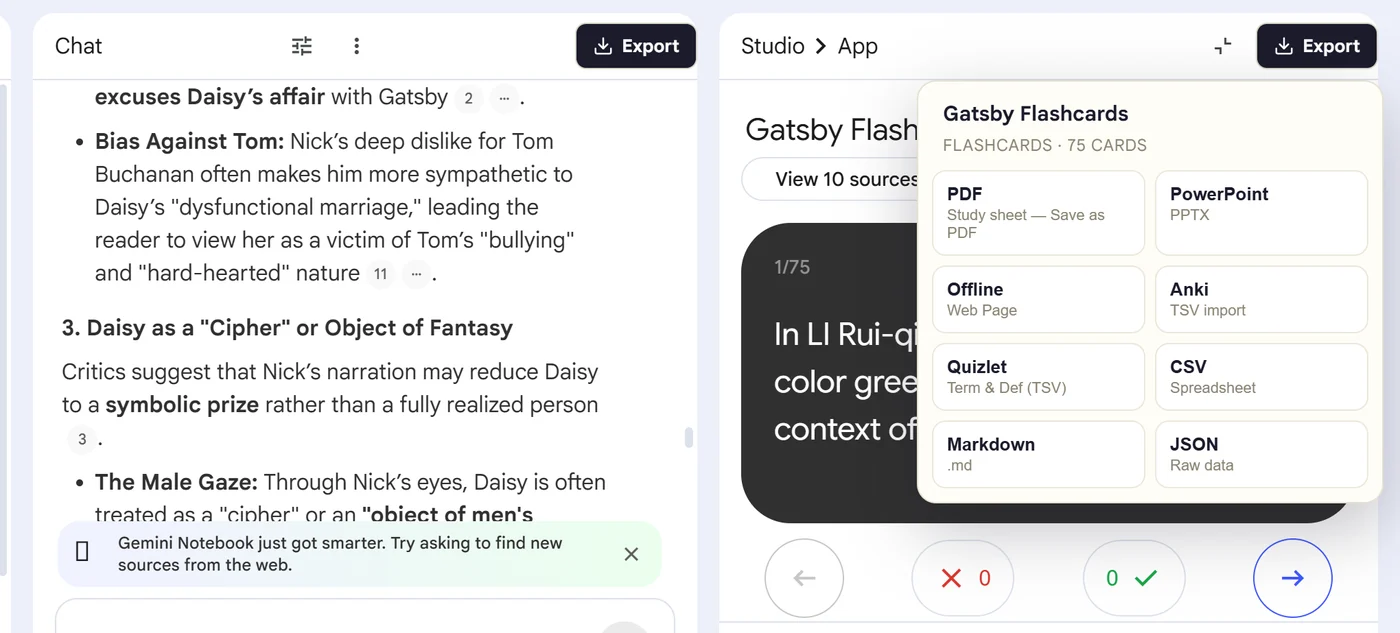
First, install the Super NotebookLM Exporter Chrome extension linked on this page. Next, open NotebookLM Studio, select the flashcard set and wait for the card canvas to load. Locate the Export ▾ button at the top of the flashcard canvas. Then, choose Quizlet to download the tab-separated terms and definitions. Finally, open Quizlet on the web, create a flashcard set, paste the content into Import, confirm the separators and review every card before publishing.
Why export it?
Why export?
Learners may need a shareable Quizlet set rather than a deck that only lives in NotebookLM. Card-by-card transfer is slow, especially when definitions contain punctuation or multiple lines.
Native option check
Can Gemini Notebook handle this export natively?
NotebookLM can download flashcards as CSV, which you could reformat manually. The extension instead prepares tab-separated terms and definitions for Quizlet's documented website import workflow.
Product capabilities reviewed against current Google help documentation in August 2026.
✓
A Quizlet-ready file
✓
Front-and-back pairs stay together
✓
No card-by-card copy-paste
✓
A portable copy outside the notebook
Step-by-step guide
Download NotebookLM Flashcards for Quizlet in 5 Steps
Open NotebookLM Studio, select the flashcard set and wait for the card canvas to load
Locate the Export ▾ button at the top of the flashcard canvas
Choose Quizlet to download the tab-separated terms and definitions
Open Quizlet on the web, create a flashcard set, paste the content into Import, confirm the separators and review every card before publishing
Where it fits
Who uses this export workflow?
01
Shared classes
02
Mobile study
03
Vocabulary sets
04
Collaborative review
Common follow-up questions
What people need to know before using this export
Can Quizlet import NotebookLM flashcards?
Yes. Quizlet accepts pasted term-and-definition text, and the exporter prepares each NotebookLM card as one tab-separated row.
Can I study the set on mobile afterward?
Yes. Quizlet currently requires the import on its website, but the saved set can then be studied in its mobile apps.
What if a card contains a tab or line break?
Inspect the Quizlet preview carefully because separator characters can split fields or cards. Edit problematic rows before creating the set.
Questions, answered
FAQ
Can I export NotebookLM flashcards to Quizlet?+
Yes. Open the flashcard deck, select Export, choose Quizlet, and complete the destination's import or editing workflow.
Does NotebookLM already export flashcards?+
Gemini Notebook provides a native CSV download. The extension is useful for additional outputs and destination-ready formats.
Will terms and definitions stay paired?+
Yes. Each flashcard front is kept with its corresponding back in the exported structure.
Should I check formatting after import?+
Yes. Review long text, special characters, equations and line breaks because destination apps apply their own formatting rules.
Can Quizlet import NotebookLM flashcards on mobile?+
Quizlet currently requires the website for importing content. Once the set is created, it can be studied through Quizlet's mobile apps.
How should NotebookLM flashcards be separated for Quizlet?+
Use a tab between each term and definition and a new line between cards, then confirm those separators in Quizlet's import screen.
Product references
Native-feature comparisons on this page were checked against Google's current Gemini Notebook help pages.
Ready when the artifact is
Export NotebookLM Flashcards to Quizlet
Export NotebookLM flashcards as tab-separated terms and definitions ready to paste into Quizlet's website import screen.
Add to Chrome Extension