
NotebookLM export guide
Export a NotebookLM quiz to Google Forms
Turn the quiz open in NotebookLM into an editable Google Form without recreating every question. The workflow carries over the questions, answer choices and answer information, then creates the form in your Drive for review.
Chrome extension · Review generated content before publishing or grading
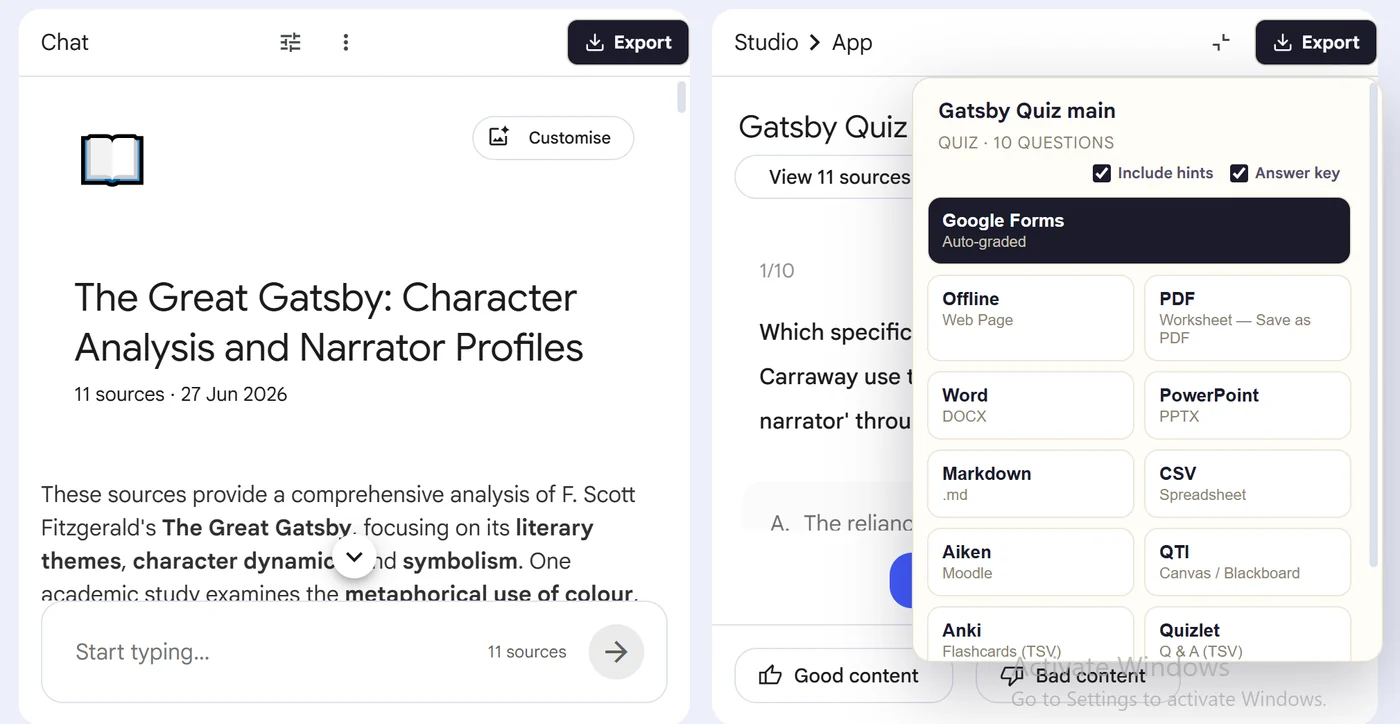
Product preview
See what the export looks like

Quick answer
How to export a quiz from Gemini Notebook to Google Forms
First, install the dedicated NotebookLM Quiz to Google Form Chrome extension linked on this page. Next, open NotebookLM Studio, select the completed quiz and wait for its canvas to load. Locate the Google Form export button in the Studio header beside the quiz controls. Then, click the button and follow the sign-in or authorization steps shown by the form-creation workflow. Finally, open the new form in Google Drive and check quiz mode, answer keys, points and response settings before sharing it.
Why export it?
Why export?
A NotebookLM quiz works for individual practice, but it does not collect a class set of responses. Re-entering every question, choice and answer key in Google Forms wastes preparation time and increases the chance of assigning the wrong answer.
Native option check
Can Gemini Notebook handle this export natively?
NotebookLM does not provide a direct create-in-Google-Forms action for an existing quiz artifact. The dedicated extension creates the form workflow; Google Forms then controls quiz mode, points, feedback, response access and grade release.
Product capabilities reviewed against current Google help documentation in August 2026.
✓
A Google Forms-ready output
✓
Questions and choices stay grouped
✓
Less copy-paste and fewer transcription errors
✓
A reusable asset outside NotebookLM
Step-by-step guide
Send a NotebookLM Quiz to Google Forms in 5 Steps
Open NotebookLM Studio, select the completed quiz and wait for its canvas to load
Locate the Google Form export button in the Studio header beside the quiz controls
Click the button and follow the sign-in or authorization steps shown by the form-creation workflow
Open the new form in Google Drive and check quiz mode, answer keys, points and response settings before sharing it
Where it fits
Who uses this export workflow?
01
Auto-graded assignments
02
Exit tickets
03
Remote assessments
04
Response collection
Common follow-up questions
What people need to know before using this export
Where does the Google Form go?
The completed form is saved in the connected Google Drive account and opens in Google Forms for editing.
Will it grade responses automatically?
The workflow carries answer information, but you should confirm quiz mode, correct answers and points in Google Forms before sharing the link.
Can students outside my school open it?
That depends on the Google Form's response and organization settings. Review restrictions before publishing to people outside your domain.
Questions, answered
FAQ
Can I turn a NotebookLM quiz into a Google Form?+
Yes. The dedicated extension captures the open quiz and starts the MyQuizGPT workflow that creates a Google Form in your Drive.
Will the Google Form be auto-graded?+
The workflow is designed to create quiz questions with answer information. Review form settings, point values and answer keys before sending it to learners.
Where is the form created?+
After authorization and creation, the form is stored in the connected Google Drive account.
Which extension should I install?+
Install the dedicated NotebookLM Quiz to Google Form Exporter linked on this page.
Can NotebookLM export directly to Google Forms?+
NotebookLM does not provide a native create-in-Google-Forms control for an existing quiz. The dedicated extension creates the form workflow from the open quiz.
Do I need a Google account to create the form?+
Yes. You must authorize the workflow with the Google account that will own the form, then review its quiz and response settings in Google Drive.
Product references
Native-feature comparisons on this page were checked against Google's current Gemini Notebook help pages.
Ready when the artifact is
Export a NotebookLM quiz to Google Forms
Turn the quiz open in NotebookLM into an editable Google Form without recreating every question. The workflow carries over the questions, answer choices and answer information, then creates the form in your Drive for review.
Add to Chrome Extension