
NotebookLM export guide
Export a NotebookLM quiz to QTI
Package the open NotebookLM quiz as a QTI ZIP for import into compatible Canvas, Blackboard and Brightspace assessment workflows.
Chrome extension · Review generated content before publishing or grading
Quick answer
How to export a quiz from Gemini Notebook to QTI
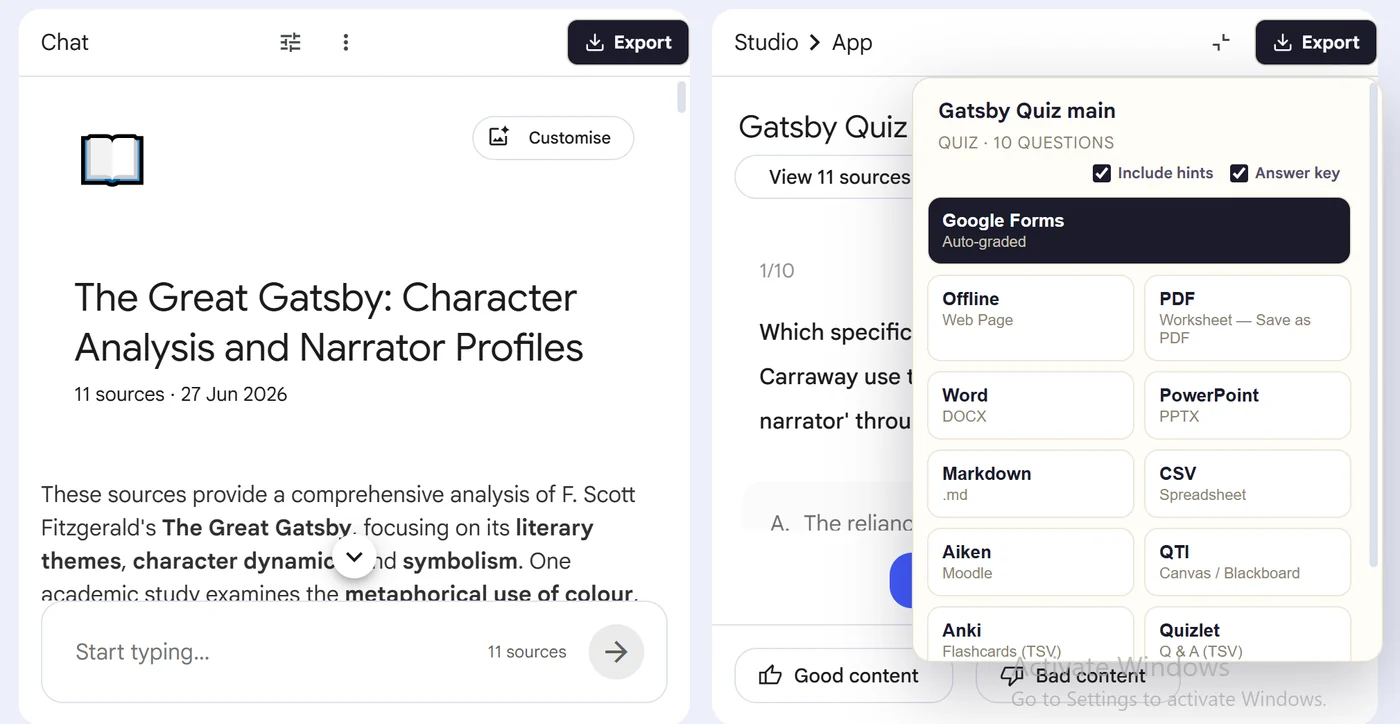
First, install the Super NotebookLM Exporter Chrome extension linked on this page. Next, open NotebookLM Studio, select the completed quiz and wait for the canvas to load. Locate the Export ▾ button at the top of the quiz canvas. Then, choose QTI from the export menu. Finally, download the QTI ZIP without unpacking it, import it through your LMS content-import tool and verify every question in a test course.
Why export it?
Why export?
Learning platforms do not accept a NotebookLM screen or ordinary document as an assessment import. They require a supported interchange package with a manifest, question records, choices and answer information.
Native option check
Can Gemini Notebook handle this export natively?
NotebookLM does not natively package completed quizzes as QTI. The extension creates a QTI ZIP, but the receiving LMS still determines which QTI version and question features it can import correctly.
Product capabilities reviewed against current Google help documentation in August 2026.
✓
A QTI-ready output
✓
Questions and choices stay grouped
✓
Less copy-paste and fewer transcription errors
✓
A reusable asset outside NotebookLM
Step-by-step guide
Download a NotebookLM Quiz as QTI in 5 Steps
Open NotebookLM Studio, select the completed quiz and wait for the canvas to load
Locate the Export ▾ button at the top of the quiz canvas
Choose QTI from the export menu
Download the QTI ZIP without unpacking it, import it through your LMS content-import tool and verify every question in a test course
Where it fits
Who uses this export workflow?
01
Canvas imports
02
Blackboard imports
03
Brightspace workflows
04
LMS migration
Common follow-up questions
What people need to know before using this export
Can I import the QTI file into Canvas?
Canvas supports QTI imports through its course-content import workflow. Platform configuration varies, so test the package in a non-production course first.
Does QTI work with Blackboard and Brightspace?
Those systems support QTI workflows, but compatibility depends on version, enabled tools and question type. Validate the imported result rather than assuming exact parity.
Why is the export a ZIP file?
A QTI package contains XML assessment data and a manifest inside an archive. Upload the package as provided unless your LMS specifically instructs otherwise.
Questions, answered
FAQ
Can I export a NotebookLM quiz to QTI?+
Yes. Open the quiz, choose Export, select QTI, and download or import the generated output.
Does the export include answer choices?+
Yes. Multiple-choice questions retain their available options in the destination-appropriate structure.
Does it include correct answers?+
Supported quiz exports carry answer information where the destination format allows it. Review the export settings before creating a student-facing copy.
Should I review the quiz after export?+
Yes. Always verify AI-generated questions, answers and destination formatting before assigning or publishing the quiz.
What is a QTI file for a NotebookLM quiz?+
QTI is an assessment interchange package used to move quiz content into compatible learning platforms such as Canvas, Blackboard and Brightspace.
Should I unzip the QTI package before importing it?+
Usually no. Select the downloaded ZIP in the LMS content-import tool, then inspect the imported questions and answer keys in a test course.
Product references
Native-feature comparisons on this page were checked against Google's current Gemini Notebook help pages.
Ready when the artifact is
Export a NotebookLM quiz to QTI
Package the open NotebookLM quiz as a QTI ZIP for import into compatible Canvas, Blackboard and Brightspace assessment workflows.
Add to Chrome Extension